|
主机名 |
IP地址 |
角色 |
|
W-CN01 |
10.10.10.17/24 |
Web Sites Cloud Controller |
|
W-Rest01 |
10.10.10.18/24 |
Web Sites Cloud Management Server |
|
W-FS01 |
10.10.10.19/24 |
Web Sites Cloud File Server |
|
W-PB01 |
10.10.10.20/24 |
Web Sites Cloud Publisher |
|
W-WS01 |
10.10.10.21/24 |
Web Sites Cloud Shared Web Worker |
|
W-WR01 |
10.10.10.22/24 |
Web Sites Cloud Reserved Web Worker |
|
W-PE01 |
10.10.10.23/24 |
Web Sites Cloud Front End |
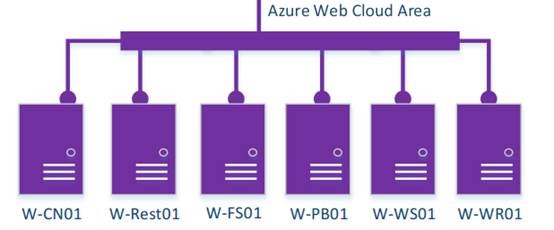
本篇涉及服务器如下图(紫色为已完成,红色为进行中,蓝色为计划中)

Azure Web Cloud Area如下图:
|
主机名 |
此项的 IP 地址 |
|
* |
10.10.10.23 |
|
*.scm |
10.10.10.23 |
|
ftp |
10.10.10.20 |
|
publish |
10.10.10.20 |
2、 创建以下 Active Directory 全局安全组:
l FileShareOwners
l FileShareUsers
l CertStoreFSUsers
3、 创建以下 Active Directory 帐户作为服务帐户。要创建的帐户为
l FileShareOwner
l FileShareUser
l CentralCertStoreUser
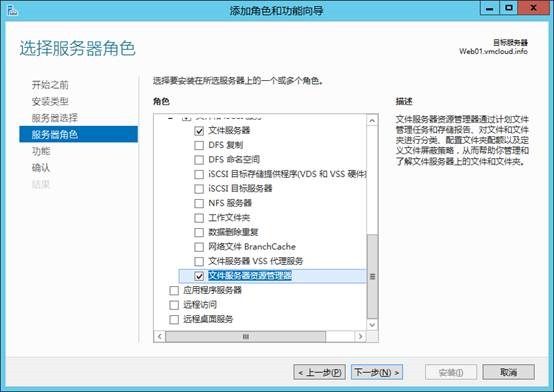
4、 进行W-FS01,为WAP准备文件服务器资源管理器 (FSRM):
5、 接着将FileShareOwner 添加到 FileShareOwners 组、FileShareUser 添加到 FileShareUsers 组、CentralCertStoreUser 添加到 CertStoreFSUsers 组。
6、 最重要的一步,记得在所有的Website上做,否则将创建失败:
l 在每台服务器运行该命令,关闭UNC:reg add HKLM\SOFTWARE\Microsoft\Windows\CurrentVersion\Policies\system /v LocalAccountTokenFilterPolicy /t REG_DWORD /d 1 /f
l 重启服务器
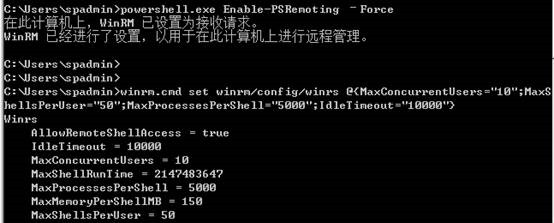
7、 然后根据官方白皮书,使用命令配置文件服务器:
powershell.exe Enable-PSRemoting –Force
winrm.cmd set winrm/config/winrs @{MaxConcurrentUsers=”10″;MaxShellsPerUser=”50″;MaxProcessesPerShell=”5000″;IdleTimeout=”10000″}
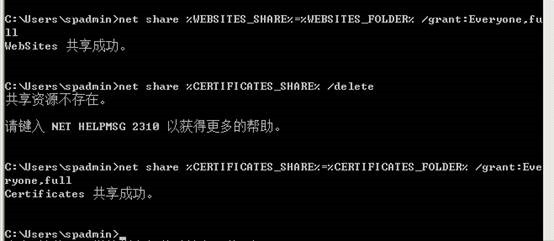
8、 接着使用白皮书提供的命令,设置Web云所需的文件共享:
set WEBSITES_SHARE=WebSites
set CERTIFICATES_SHARE=Certificates
set WEBSITES_FOLDER=”D:\WebSites”
set CERTIFICATES_FOLDER=”D:\Certificates”
md %WEBSITES_FOLDER%
md %CERTIFICATES_FOLDER%
net share %WEBSITES_SHARE% /delete
net share %WEBSITES_SHARE%=%WEBSITES_FOLDER% /grant:Everyone,full
net share %CERTIFICATES_SHARE% /delete
net share %CERTIFICATES_SHARE%=%CERTIFICATES_FOLDER% /grant:Everyone,full
9、 为使 Windows 远程管理正常工作,必须将 FileShareOwners 组添加到本地 Administrators 组
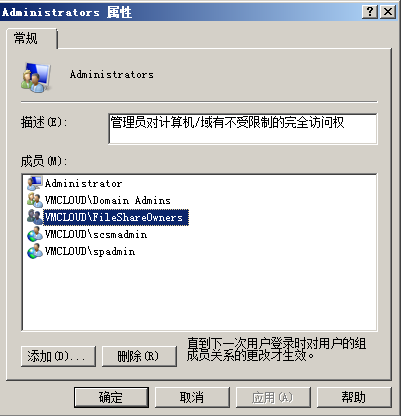
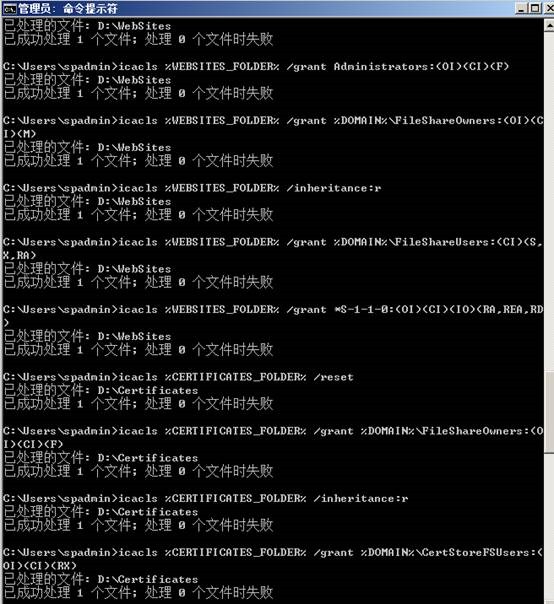
10、 配置细致的文件共享权限,也可以直接使用白皮书提供的语句:
set DOMAIN=”vmcloud.info“
set WEBSITES_FOLDER=”D:\WebSites“
set CERTIFICATES_FOLDER=”D:\Certificates”
icacls %WEBSITES_FOLDER% /reset
icacls %WEBSITES_FOLDER% /grant Administrators:(OI)(CI)(F)
icacls %WEBSITES_FOLDER% /grant %DOMAIN%\FileShareOwners:(OI)(CI)(M)
icacls %WEBSITES_FOLDER% /inheritance:r
icacls %WEBSITES_FOLDER% /grant %DOMAIN%\FileShareUsers:(CI)(S,X,RA)
icacls %WEBSITES_FOLDER% /grant *S-1-1-0:(OI)(CI)(IO)(RA,REA,RD)
icacls %CERTIFICATES_FOLDER% /reset
icacls %CERTIFICATES_FOLDER% /grant %DOMAIN%\FileShareOwners:(OI)(CI)(F)
icacls %CERTIFICATES_FOLDER% /inheritance:r
icacls %CERTIFICATES_FOLDER% /grant %DOMAIN%\CertStoreFSUsers:(OI)(CI)(RX)
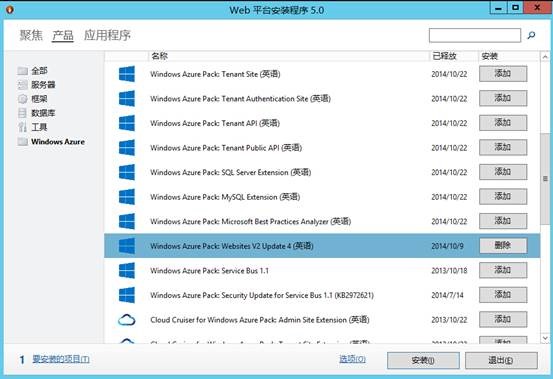
11、 接着进入W-CN01,跟安装VM云一样打开Web平台安装程序,选择Windows Azure WebSite V2 Update4:
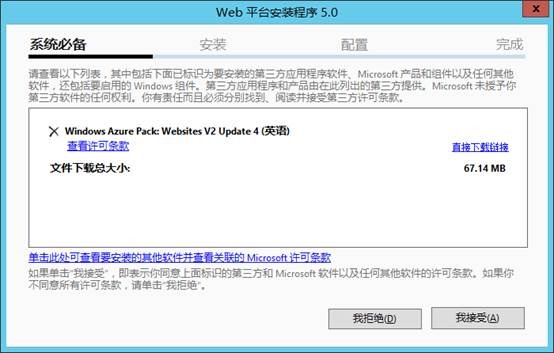
12、 接受协议:
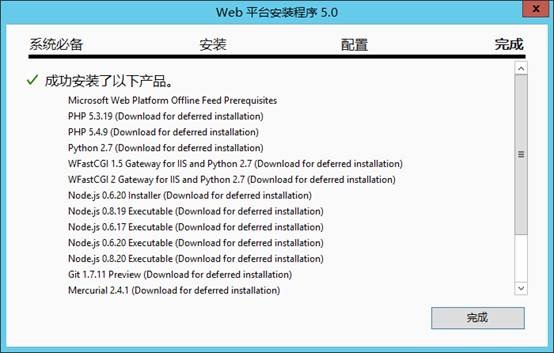
13、 安装完成后:
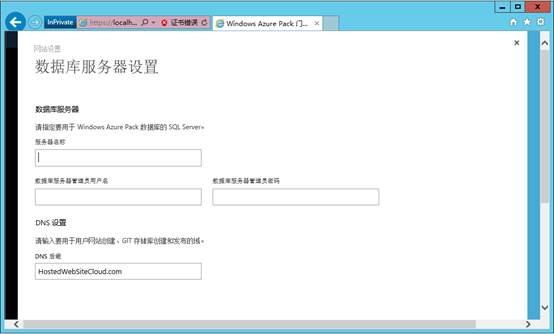
14、 点击打开弹出的网站,进行参数设置:


OkWing Gift Code Today, I'm hunting for a gift code to get a bonus. Where are those at?! I need an edge! Get your code here: okwingiftcodetoday
Had a bit of a lucky streak here yesterday! The login is seamless and the games load quickly without any lag. Visit 567jililogin if you want to try your luck.
Such a hidden gem. The variety of games is impressive and the loading time is almost zero. Give neu88com a try!
Finally a site that feels fair and transparent. The user interface is clean and easy to navigate even for beginners. Big thanks to idbigobet.
The app is very lightweight and doesn't lag at all on my phone. Downloading bdbc777apk was the best decision for gaming on the go.
The registration process was a breeze and I started playing in under two minutes. Great service from balislotlogin